
Introduction
Black Friday 2026 lands on November 27, and Cyber Monday follows on November 30. That gives you about two weeks. Your ads may be ready, but is your product page?
Most furniture sales are won or lost on the product page. Shoppers arrive from a deal email or an ad. Then they decide in seconds whether the page feels clear, fast and trustworthy.
At Blue Ribbon 3D, we help furniture brands prepare their visuals for peak weeks. This checklist covers images, details, price, shipping, speed and trust. It also includes a 14-day plan you can start today.
| Quick Answer A Black Friday-ready furniture product page needs sharp images, exact dimensions, a clear price and offer, honest delivery dates, fast mobile loading and visible trust signals. Fix your bestsellers first. Then work down the list as time allows. |
Key Takeaways
- Start with your bestsellers, because they carry most of the traffic.
- Images and dimensions answer the most common furniture questions.
- Clear delivery dates matter more than ever in a holiday rush.
- A fast mobile page protects every ad dollar you spend.
- A simple 14-day plan keeps the work calm and finishable.
At a Glance: The Checklist in Six Blocks
| Block | What to check | Priority |
| Images | Main image, angles, details, dimensions, lifestyle | Do first |
| Details | Size, materials, assembly, care, warranty | Do first |
| Offer and shipping | Price, deal terms, delivery dates, returns | Do first |
| Speed and mobile | Image size, loading, phone layout | Do next |
| Trust | Reviews, contact info, secure checkout | Do next |
| SEO and tracking | Title, alt text, schema, indexing | If time allows |
What Does a Black Friday-Ready Furniture Product Page Need?
True holiday readiness means more than a discount banner. It means every product page answers a shopper’s questions without a call or an email.
Furniture is a considered purchase. Buyers ask about size, colour, material and delivery. If your page answers those four questions fast, you win the sale. If it does not, they open another tab.
So think in blocks. Each block below covers one set of questions, and each one has a short checklist.
Which Furniture Product Images Matter Most?
Strong furniture product images do the selling work of a showroom visit. Shoppers cannot touch the piece, so images must show shape, scale, fabric and finish.
Check that every bestseller has these five images.
- Main image: the product alone on a clean background, sharp and centred.
- Extra angles: side, back and three-quarter views.
- Detail close-ups: fabric weave, stitching, wood grain and hardware.
- Dimension graphic: width, depth and height in one clear drawing.
- Lifestyle scene: the product in a styled room, so shoppers can picture it at home.
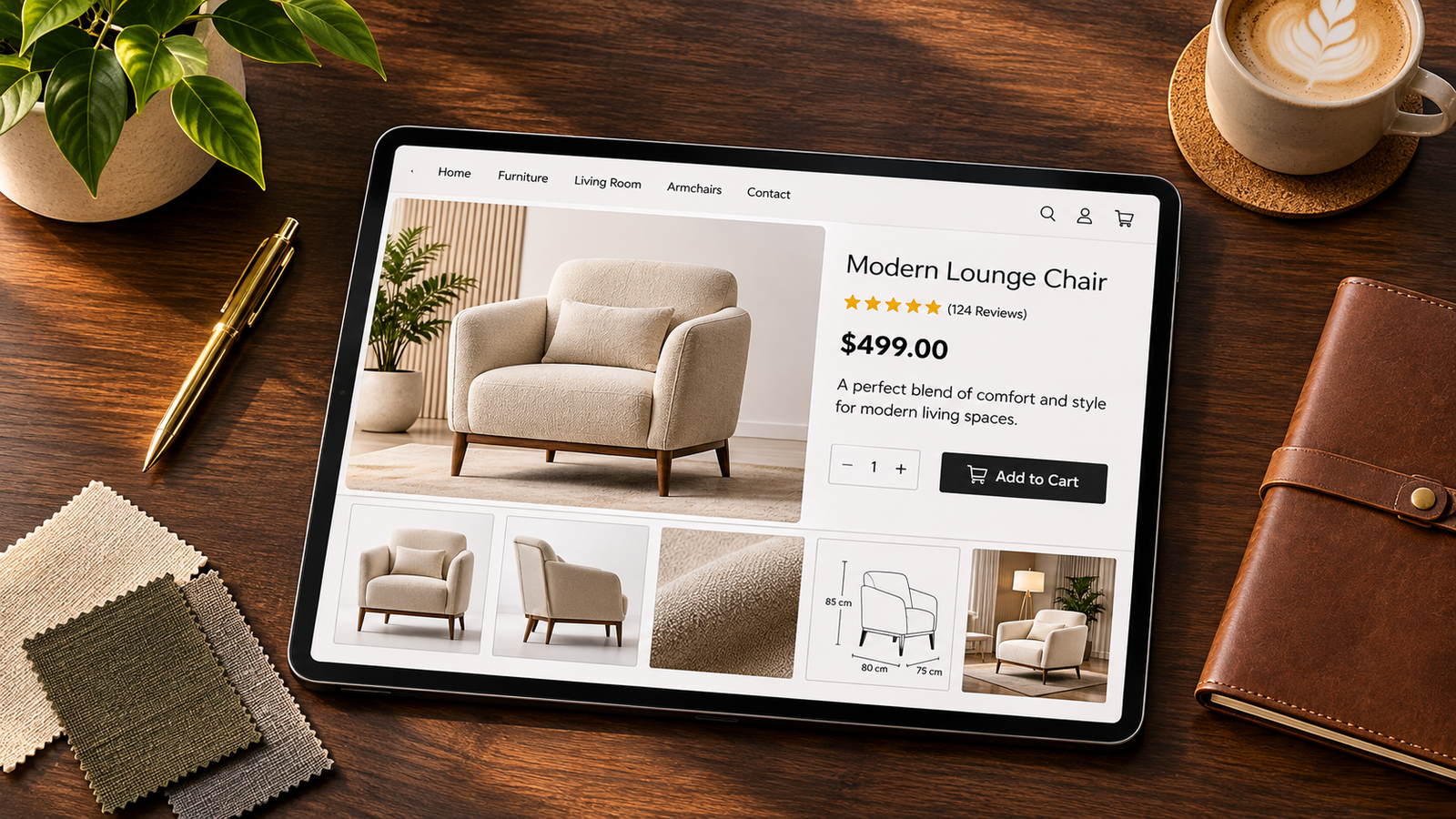
Also check consistency. Mixed lighting and backgrounds make a page look rushed. Therefore, use one style across the whole collection.
If you lack images for a new colour or a new product, 3D renders can fill the gap quickly. One accurate model can produce every fabric and angle, so you avoid new photo shoots in the busiest weeks.
Which Product Details Reduce Questions?
Details turn browsers into buyers. Review every bestseller page against this table.
| Detail | What to show |
| Dimensions | Width, depth, height, seat height and clearance |
| Materials | Frame, fill, fabric or finish, in plain words |
| Assembly | Ready-built or flat-packed, and the time needed |
| Weight | Total weight, for delivery and stairs |
| Care | Cleaning and maintenance tips |
| Warranty | Length and what it covers |
Place the most important details above the fold. Then put the rest in a short, scannable list below the main images.
How Should You Show Price, Offer and Shipping?
Confusion kills sales. Shoppers must see the deal, the price and the delivery date at a glance.
- Show the sale price clearly: display the original price next to it, if your rules allow.
- State the offer end date: tell shoppers when the deal stops.
- Give a delivery window: say when the product ships and when it should arrive.
- Mention holiday cut-offs: explain the last order date for delivery before major holidays.
- Explain returns in one line: link to the full policy for the details.
Delivery matters most for furniture. Large items take time, and buyers dislike surprises. Therefore, be honest and specific.
How Do You Make the Page Fast on Mobile?
Many shoppers will browse on their phones. A slow page loses them before they see a single image.
- Compress images: use modern formats and sensible sizes, so pages load quickly.
- Lazy-load lower images: load images below the fold only when shoppers scroll.
- Limit pop-ups: one clear banner is enough on a product page.
- Test on a real phone: check the layout, the buttons and the checkout flow.
Keep the order button visible without scrolling too far. Meanwhile, make sure image galleries swipe smoothly.
How Do You Build Trust Quickly?
Shoppers spend more on furniture than on most online items. So trust signals matter.
- Real reviews: show honest ratings and read them yourself.
- Contact details: show an email, phone or chat option.
- Secure checkout: make sure the payment page looks safe and familiar.
- Clear policies: link to returns, shipping and warranty pages.
- Accurate visuals: make sure renders and photos match the real product.
What About Stock Levels and Pre-Orders?
Sales weeks strain inventory. Therefore, check stock before the sale starts, and fix your product statuses.
Next, compare your listed stock with your real stock. Mismatches cause cancelled orders, and cancellations hurt trust more than a sold-out label does.
If an item sells out, say so clearly. Offer a back-in-stock alert or a pre-order with an honest ship date. Never leave shoppers guessing.
For pre-orders, state the expected ship window and explain the terms. Also, update buyers if dates change. Honest communication protects your reviews long after the sale ends.
Which SEO Basics Should You Check?
A few quick checks help your pages perform in search and in ads.
- Titles and headings: put the product name and key feature in the title and the main heading.
- Image alt text: describe each image in a short, natural sentence.
- File names: use clear names, such as the product and the angle.
- Product markup: add structured data with price and availability, if your platform supports it.
- Indexing: submit new or updated pages in Search Console, so they get crawled sooner.
Remember that indexing is never guaranteed on a fixed date. Still, early submission and clean internal links give your pages the best chance.
What Is Your 14-Day Countdown Plan?
Today is November 13. Black Friday is November 27. Use this schedule to finish calmly.
| Days | Focus | Tasks |
| Days 1–3 | Pick and audit | Choose your top products. Audit images, details and stock. |
| Days 4–7 | Fix content | Add missing images and details. Update shipping and offer text. |
| Days 8–10 | Speed and mobile | Compress images. Test pages on real phones. |
| Days 11–12 | Trust and SEO | Check reviews, policies, titles, alt text and indexing. |
| Days 13–14 | Final test | Place a test order. Fix any last issues. Freeze changes. |

Freeze changes two days before the sale. Late edits often cause errors, so only fix urgent problems.
How Should You Prepare Support and Returns?
Sales weeks bring more questions. Therefore, prepare your support team before the first deal goes live.
Start with a short list of the questions shoppers ask most. Then, add the answers to the product page itself. This step reduces tickets, and it also helps buyers decide faster.
Next, review your return terms. Shoppers read them before they buy furniture, because large items feel risky. Explain the return window, the pickup process and any fees in plain words.
Also, brief your team on the sale. Everyone should know the offer dates, the shipping cutoffs and the stock limits. As a result, customers get the same answer every time.
Finally, plan extra coverage for the first and last days of the sale. These days usually bring the most messages, so a quick reply can save an order.
What Should You Check During the Sale?
Your work does not end when the sale starts. Instead, treat the first day as a live test.
Open your top pages on a phone each morning. Check that images load, buttons work and prices match the offer. Moreover, watch your search and ad reports for sudden drops.
If you find a problem, fix it at once. Small errors, such as a wrong price or a broken image, cost sales quickly. After the sale, note what worked, so next year’s plan starts earlier.
What Mistakes Should You Avoid?
- Updating every product: focus on bestsellers first, or you will finish none.
- Hiding delivery dates: vague timing creates cancellations and complaints.
- Ignoring mobile: test on a phone, not only on your desktop.
- Over-promising: never claim a deal or a date you cannot keep.
- Skipping the test order: one test purchase finds problems fast.
Most of these mistakes share one cause: late planning. Teams often wait until the week of the sale, and then every small fix feels urgent. Therefore, start with your top products today, and work down your list in order.
Also, keep a simple shared checklist. When each person owns a task, nothing falls through the cracks. As a result, you launch with confidence instead of stress. Even a basic spreadsheet works well for this.
Frequently Asked Questions
When is Black Friday 2026?
Black Friday 2026 falls on November 27, the day after Thanksgiving on November 26. Cyber Monday follows on November 30. Many stores start their deals earlier in the week, so prepare your pages ahead of time.
What should a furniture product page include for Black Friday?
A furniture product page should include sharp images, exact dimensions, material details, a clear price and offer, honest delivery dates, easy returns information and visible trust signals. Fix bestsellers first.
How many images does a furniture product page need?
A strong page usually has a main image, a few angles, detail close-ups, a dimension graphic and a lifestyle scene. That is about five to nine images, depending on the product and your channels.
How do I prepare my furniture store for holiday traffic?
Check stock, update delivery dates, compress images, test mobile pages and place a test order. Also, review your returns and shipping pages, so shoppers find clear answers quickly.
Should I use 3D renders for Black Friday product pages?
Yes, if you lack images for new products or colours. One accurate 3D model can produce many fabrics and angles without a new photo shoot. Make sure the renders match the real product.
How can I make furniture product pages load faster?
Compress and resize images, lazy-load images below the fold, limit pop-ups and test on a real phone. Fast pages keep shoppers engaged and protect your ad spend.
What should I do if a product sells out?
Say so clearly. Offer a back-in-stock alert or a pre-order with an honest ship date. Update buyers if dates change, because honest communication protects your reviews.
Can I get new pages indexed before Black Friday?
Submit new or updated pages in Search Console and link to them from your homepage or sale page. These steps help, but no one can guarantee indexing by a fixed date.
Conclusion
A Black Friday page does not need to be perfect. It needs to be clear. Sharp images, honest details and fast loading win more orders than any banner.
First, pick your bestsellers. Next, work through the checklist block by block. Then test, freeze and launch with confidence.
Need new images before the sale? Blue Ribbon 3D builds photoreal renders, 360° views and AR models from one accurate 3D model, so your pages stay fresh and consistent.
| Get Your Free Sample Request a free sample render for one of your products. Contact us here to get started. |
Related posts

Furniture Asset Matrix: How Many Images Does Each SKU Need?
Introduction Every furniture brand eventually asks the same question: how many images does each produ …

Furniture Tariffs 2026: How US Brands Launch With 3D Renders Before Inventory Lands
Introduction Most advice on furniture tariffs 3D renders starts with price. This guide starts with ti …